Search Header
Displays the centered title and the searched-for term at the top of the search results page.
The Search Header section renders the heading and, when a shopper has searched, a line showing the term they searched for. It sits at the top of the search results page and inherits the store's fonts and color scheme.

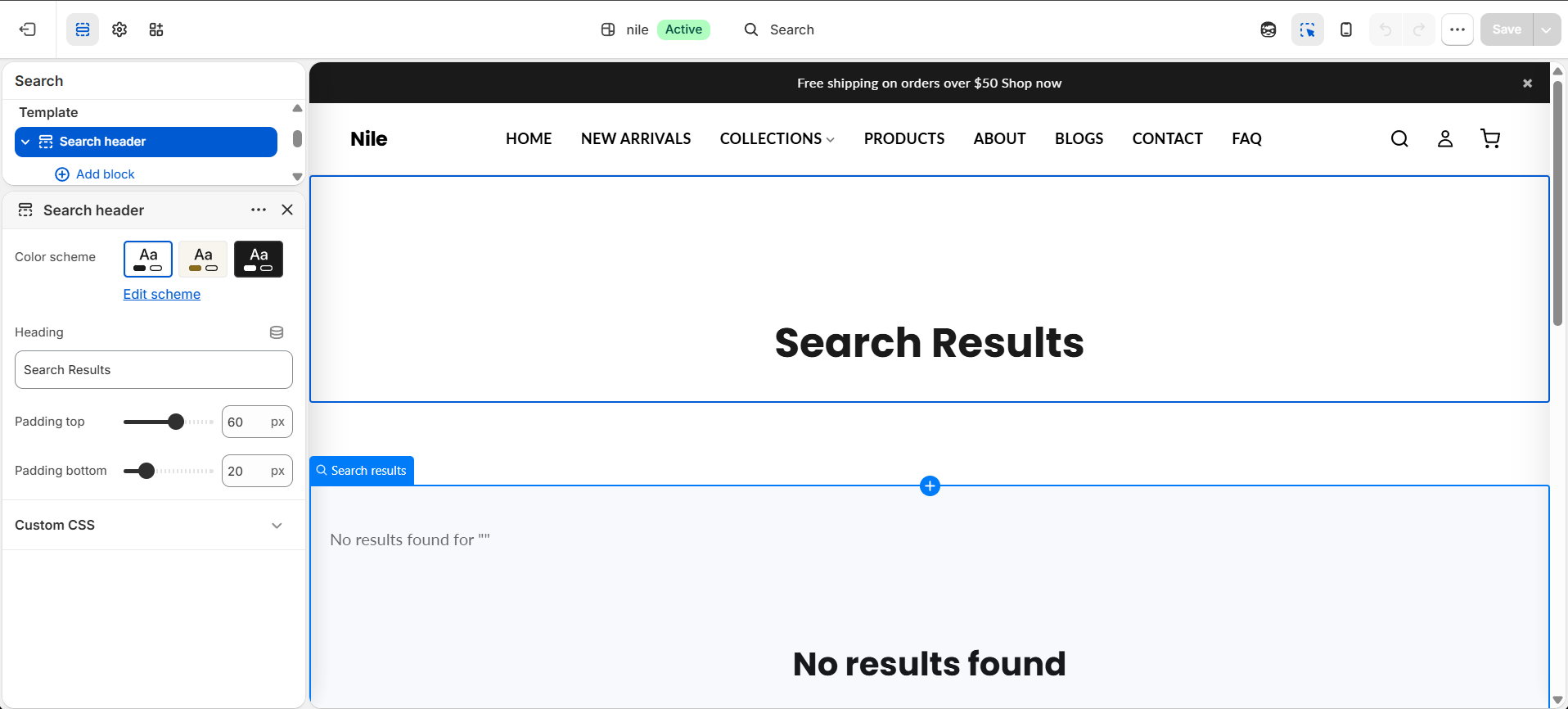
How to use it
In the Shopify theme editor, add or open this section, then:
- In the theme editor, open the Search results page (search for any term to preview it) and select the Search Header section.
- Edit the Heading field to change the title text (default is Search Results).
- Choose a Color scheme to control the background and text colors.
- Adjust Padding top and Padding bottom to control the vertical spacing around the header.
- Click Save.
The searched-for term line ("Searching for …") only appears when a shopper has actually submitted a search query; it stays hidden on an empty search page.
The heading font size scales down automatically on mobile (from 2.5rem to 1.75rem), so no separate mobile setting is needed.
Settings reference
| Setting | Type | Default | What it does |
|---|---|---|---|
| Color scheme | color_scheme | scheme-1 | Sets the background and text colors for the header using one of the theme's saved color schemes. |
| Heading | text | Search Results | The title text shown at the top of the search results page. |
| Padding top | range | 60px | Space above the header content (0-100px, in steps of 10). |
| Padding bottom | range | 20px | Space below the header content (0-100px, in steps of 10). |
This section accepts app blocks only (@app), so apps can inject content beneath the header; it has no standard configurable blocks.
Developer notes
Renders the section-color-scheme snippet, which exposes the color-scheme CSS variables via the --color-background / --color-text custom properties.
- All CSS class names are scoped with
{{ section.id }}to avoid collisions, and styles are inlined in<style>blocks within the section. - The searched term is output with
{{ search.terms | escape }}to prevent HTML injection. - App blocks are rendered in a trailing loop that only outputs blocks of type
@app.
<h1 class="search-header-title-{{ section.id }}">{{ section.settings.heading }}</h1>
{%- if search.terms -%}
  <p>{{ 'search.searching_for' | t }} <span>{{ search.terms | escape }}</span></p>
{%- endif -%}