Custom Liquid
Adds a section where you can insert your own Liquid or HTML code to create custom, dynamic content anywhere in the theme.
Not on any page by default. Add it in the theme editor with Add section → Custom Liquid, on whichever template you need it.
The Custom Liquid section lets you drop your own Liquid or HTML code into a page to build content the built-in sections don't cover. If the Liquid field is filled it is rendered; otherwise the HTML field is used as a fallback. The section outputs nothing at all when both fields are empty.
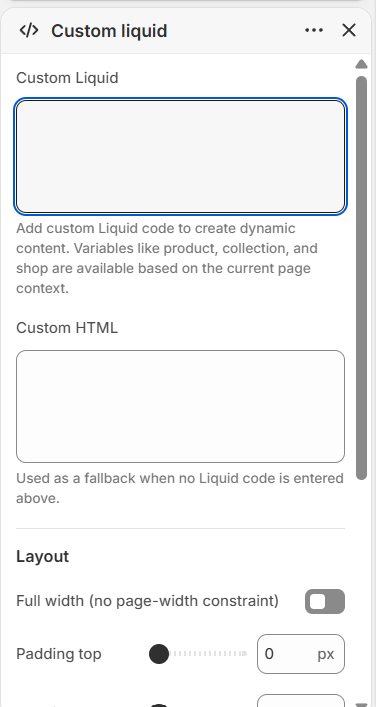
How to use it
In the Shopify theme editor, add or open this section, then:
- In the theme editor, add the Custom liquid section to a page or open an existing one.
- Paste your code into the Custom Liquid field (Liquid or HTML both work here), or use the Custom HTML field as a simpler fallback.
- Under Layout, tick Full width to remove the page-width constraint, or adjust Padding top and Padding bottom for spacing.
- Under Colors, optionally set a Background color and Text color for the section.
- Click Save and preview the page to confirm your content renders correctly.
Only the Custom Liquid field renders when both are filled. The Custom HTML field acts purely as a fallback, so put your main content in the Liquid field.
Page-context objects like product, collection, and shop are available in the Liquid field, so the same section can show different content depending on the page it's placed on.
Leaving both fields blank makes the section render nothing at all, so remember to add content or it will silently disappear.
Settings reference
| Setting | Type | Default | What it does |
|---|---|---|---|
| Custom Liquid | liquid | - | Add custom Liquid code to create dynamic content. Variables like product, collection, and shop are available based on the current page context. |
| Custom HTML | html | - | Used as a fallback when no Liquid code is entered above. |
| Full width (no page-width constraint) | checkbox | false | When on, content spans the full viewport width instead of the centered page-width container. |
| Padding top | range | 0 | Top padding in px (0-100, step 4). |
| Padding bottom | range | 0 | Bottom padding in px (0-100, step 4). |
| Background color | color | - | Applied only when a non-transparent color is chosen. |
| Text color | color | - | Applied only when a non-transparent color is chosen. |
Developer notes
The wrapper is a <section> with an inner .custom-liquid-section__inner that receives the page-width class unless Full width is enabled.
- Padding and colors are emitted in a scoped
{% style %}block keyed to#CustomLiquid-{{ section.id }}; color rules are only written when the value is set and notrgba(0,0,0,0). - No external assets, CSS files, or JavaScript are loaded by this section; all styling comes from the inline style block plus theme-wide classes.
- The entire section is wrapped in an
{% if custom_liquid != blank or custom_html != blank %}guard, so empty configurations produce no markup.
{%- if section.settings.custom_liquid != blank -%}
  {{ section.settings.custom_liquid }}
{%- elsif section.settings.custom_html != blank -%}
  {{ section.settings.custom_html }}
{%- endif -%}