Age Verifier
A full-screen age-verification gate that blocks visitors until they confirm they meet a minimum age.
The Age Verifier shows a blocking modal overlay before visitors can view your store, requiring them to confirm they are of legal age via a simple Yes/No choice or by entering their date of birth. A verified visitor is remembered in their browser for a configurable number of days, and it can gate your whole site or only specific URL paths.
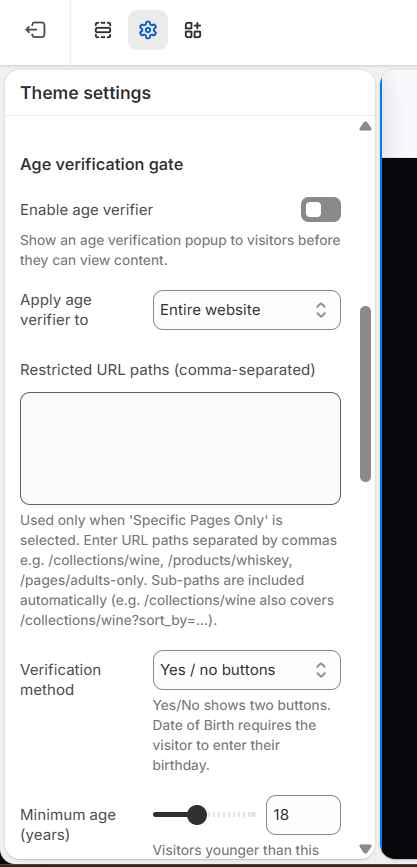
This section has no settings panel of its own. Everything is configured under Theme settings → Age verifier, not by clicking a section in the page list.
How to use it
- In the theme editor open Theme settings → Age verifier and tick Enable age verifier.
- Under Apply age verifier to choose Entire website, or pick Specific pages only and list comma-separated URL paths (e.g.
/collections/wine, /products/whiskey). - Set the Verification method (Yes/No buttons or Date of birth), the Minimum age, and how many days to remember verified visitors.
- Fill in the Modal content: optional logo, heading, subtext, button labels, and the underage/blocked message.
- Adjust the Modal appearance colors (background, text, button), then Save.
Leaving the Logo / brand image empty shows a built-in lock icon instead; recommended logo is roughly 600×240px (or SVG) transparent PNG.
When using Specific pages only, sub-paths are matched automatically - e.g. /collections/wine also covers /collections/wine?sort_by=....
Verification is stored only in the visitor's browser (localStorage), so clearing site data or switching devices re-triggers the gate.
Settings reference
| Setting | Type | Default | What it does |
|---|---|---|---|
| Enable age verifier | checkbox | false | Show an age verification popup to visitors before they can view content. |
| Apply age verifier to | select | entire_site | Choose whether the gate covers the entire website or only specific pages. |
| Restricted URL paths (comma-separated) | textarea | (empty) | Used only when 'Specific pages only' is selected. Enter URL paths separated by commas; sub-paths are included automatically. |
| Verification method | select | yes_no | Yes/No shows two buttons. Date of birth requires the visitor to enter their birthday. |
| Minimum age (years) | range | 18 | Visitors younger than this age (range 13-25) will be blocked. |
| Remember verified visitors for (days) | range | 30 | Number of days (1-90) before a verified visitor is asked again. |
| Logo / brand image | image_picker | (none) | Optional. Shown at the top of the popup. Falls back to a lock icon if not set. |
| Heading | text | Age Verification Required | Main title shown in the modal. |
| Subtext | textarea | This website contains age-restricted content. By entering, you accept our terms and confirm you are of legal age. | Supporting paragraph under the heading. |
| Enter button text | text | Yes, I am of legal age | Label for the confirm/enter button. |
| Decline button text | text | No, I am underage | Label for the decline button. |
| Underage / blocked message | text | Sorry, you must be 18 or older to view this content. | Shown when a visitor declines or fails the age check. |
| Modal background | color | #ffffff | Background color of the popup card. |
| Modal text color | color | #1a1a1a | Color of the heading and body text. |
| Button background color | color | #1a1a1a | Fill color of the enter button and lock icon. |
| Button text color | color | #ffffff | Text color of the enter button. |
Developer notes
All settings come from theme settings (config/settings_schema.json, group "Age verifier") - this section has no {% schema %} block and reads settings.age_verifier_*.
- CSS and JS are inlined in the section (no external assets). Age is computed client-side; verification is saved in
localStorageasmira_age_verifiedwith anexpirytimestamp. - Accessibility: the modal locks scroll, marks sibling elements
inert/aria-hidden, traps focus, and suppresses the Escape key so the gate can't be dismissed. - DOB month/day/year
<select>options are generated in JS; labels use translation keysage_verifier.*andaccessibility.day/month/yearfrom the storefront locales.
{%- if settings.age_verifier_enabled -%}
  {%- assign min_age = settings.age_verifier_minimum_age | default: 18 -%}
  {%- assign method  = settings.age_verifier_method | default: 'yes_no' -%}
  <div id="age-verifier-overlay" role="dialog" aria-modal="true">...</div>
{%- endif -%}