Video Hero
A full-width hero banner that plays a looping background video (uploaded, YouTube, or MP4 URL) behind an overlaid heading, subheading, and call-to-action button.
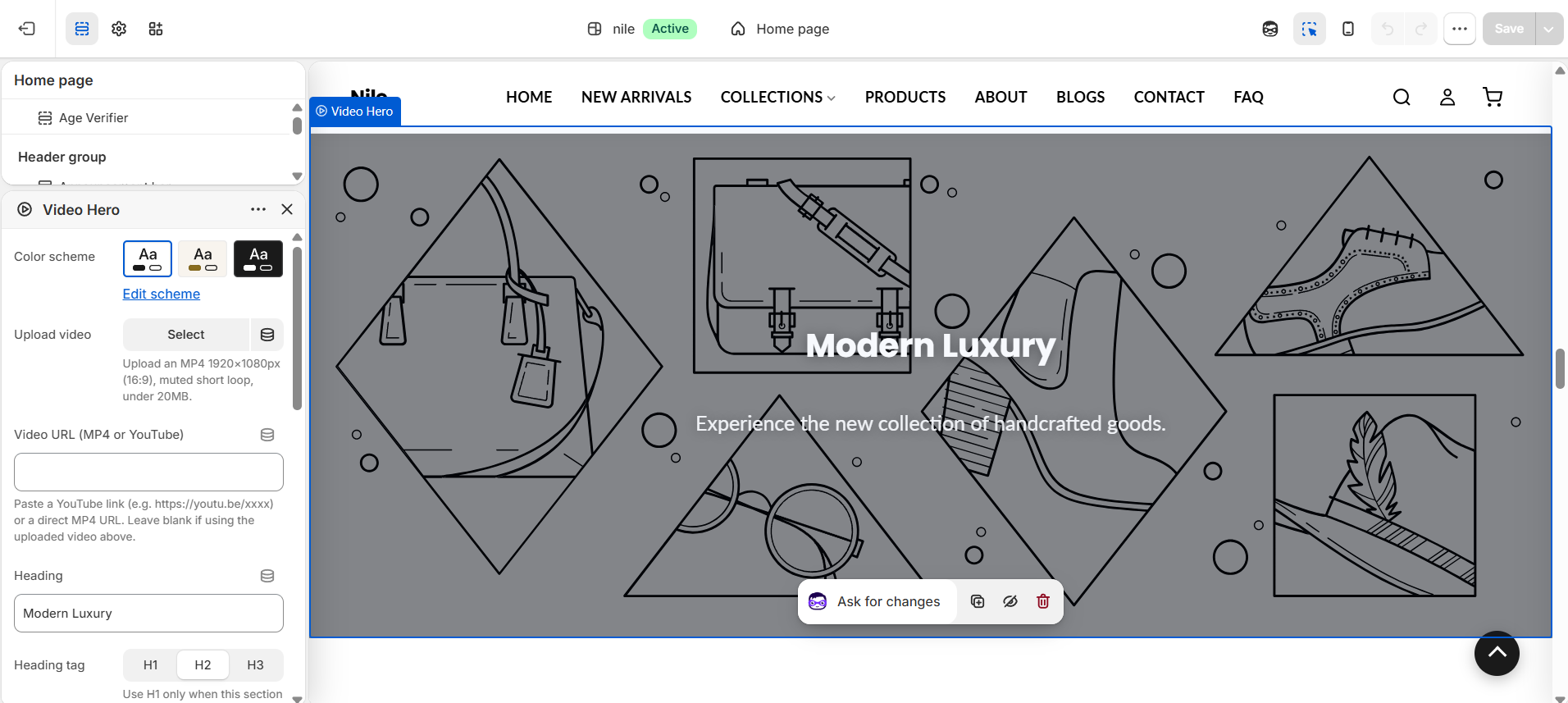
Video Hero renders a large banner with an autoplaying, muted, looping background video and a centered content layer for a heading, subheading, and button. It accepts a Shopify-hosted uploaded video, a YouTube link, or a direct MP4 URL, and falls back to a placeholder graphic when no media is set.
How to use it
In the Shopify theme editor, add or open this section, then:
- In the theme editor, add the Video hero section (or open it if already present in your home page).
- Set the background media: use Upload video for a Shopify-hosted MP4, or paste a YouTube link / direct MP4 into Video URL. Leave the URL blank if you uploaded a video.
- Enter your Heading and Subheading, and choose the Heading tag (use H1 only if this is the main page heading).
- Add a Button label and Button link to show the call-to-action button.
- Adjust Text alignment and Overlay opacity so the text stays readable over the video, then save.
Upload an MP4 at 1920×1080px (16:9), muted, as a short loop, and kept under 20MB for fast loading.
Increase Overlay opacity if the heading is hard to read over a bright video; the overlay is a black layer whose alpha equals the chosen percentage.
An uploaded video takes priority over the Video URL field; if both are empty a lifestyle placeholder image is shown.
Settings reference
| Setting | Type | Default | What it does |
|---|---|---|---|
| Color scheme | color_scheme | scheme-1 | Sets the section's background and text color palette. |
| Upload video | video | - | Upload an MP4 1920×1080px (16:9), muted short loop, under 20MB. |
| Video URL (.mp4) | text | - | Paste a direct MP4 URL - or a YouTube link (e.g. https://youtu.be/xxxx), which also works. Leave blank if using the uploaded video above. |
| Heading | text | Modern Luxury | Main headline overlaid on the video; leave blank to hide it. |
| Heading tag | select | h2 | Use H1 only when this section is the main page heading. Options: H1, H2, H3. |
| Subheading | text | Experience the new collection of handcrafted goods. | Supporting line below the heading; leave blank to hide it. |
| Button label | text | Shop Collection | Leave blank to hide the button. |
| Button link | url | - | Destination for the call-to-action button. |
| Button shape | select | default | Theme default, Rectangle, Rounded, or Rounded rectangle. |
| Button colors | select | default | Select 'Custom' to override the global button colors set in Theme Settings. |
| Custom button background | color | #ffffff | Only used when 'Button Colors' is set to Custom. |
| Custom button text | color | #000000 | Only used when 'Button Colors' is set to Custom. |
| Text alignment | select | center | Left, Center, or Right alignment for the content. |
| Overlay opacity | range | 40% | 0-90% black overlay over the video to improve text contrast. |
This section accepts only @app blocks, letting Shopify apps inject content; it has no merchant-configurable content blocks of its own.
Developer notes
Loads video-hero.css via stylesheet_tag; when a video is present it also defers video-autoplay-control.js and renders the video-autoplay-toggle snippet for a mute/play control.
- Uploaded videos use
video_tag(autoplay, loop, muted, no controls). YouTube URLs are parsed for their ID (watch, youtu.be, /embed/, /shorts/) and embedded via ayoutube-nocookie.comiframe; other URLs render a native<video>with an MP4 source. - Button colors follow the section's color scheme (
rgb(var(--color-button))/--color-button-text) unlessbutton_color_styleiscustom; the resolved values are inlined in a scoped<style>block keyed to#VideoHero-{{ section.id }}. - Overlay uses an inline
rgba(0,0,0,α)where α =overlay_opacity / 100; the section root carriesdata-banner-sectionand the media wrapperdata-video-autoplay.
{%- if vh_video != blank -%}
  {{ vh_video | video_tag: image_size: '2400x', autoplay: true, loop: true, muted: true, controls: false, class: 'video-hero__video' }}
{%- elsif vh_video_url != blank -%}
  {%- comment -%} YouTube ID parsing then youtube-nocookie iframe, else native <video> {%- endcomment -%}
{%- endif -%}