Product Reviews
Displays a customer review area on the product page, showing an average-rating summary bar, a connected reviews app's block, and an optional "Write a Review" button.
The Product Reviews section adds a reviews area to the product page. It can show an average rating summary bar pulled from your product's review metafields, embed the block from a connected reviews app (such as Shopify Product Reviews, Judge.me, or Yotpo), and display an optional Write a Review button.
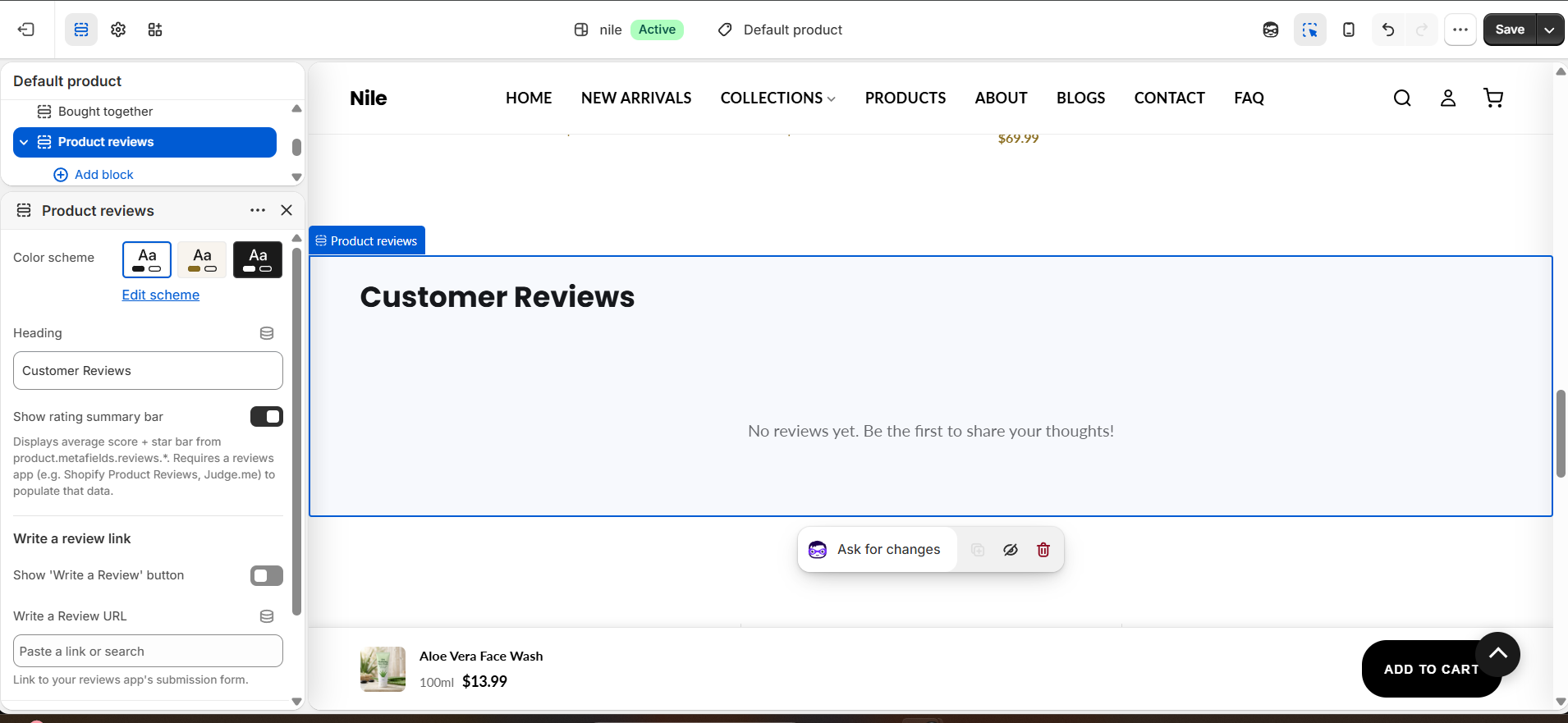
How to use it
In the Shopify theme editor, add or open this section, then:
- In the theme editor, open a Product template and select the Product reviews section (add it from Add section if it is not present).
- Enter a Heading such as "Customer Reviews" to label the area.
- Leave Show rating summary bar on to display the average score and star bar (this needs review metafield data from a reviews app).
- Add your reviews app's block inside the section so its widget renders in place.
- To invite submissions, enable Show 'Write a Review' button and paste your app's submission form link into Write a Review URL.
- Pick a Color scheme to match the rest of the product page, then save.
The rating summary and star bar only appear once a reviews app has populated product.metafields.reviews.rating and rating_count - a brand-new store with no reviews shows nothing on the live storefront.
On the live storefront an empty section (no app block, no review data, no Write-a-Review link) renders nothing, so it will not leave a blank padded gap. In the theme editor it always renders so you can configure it.
The Write a Review URL must point at your reviews app's submission form; without a URL the button is hidden even when the toggle is on.
Settings reference
| Setting | Type | Default | What it does |
|---|---|---|---|
| Color scheme | color_scheme | scheme-1 | Sets the background and text colors for the section. |
| Heading | text | Customer Reviews | Title shown above the reviews area. |
| Show rating summary bar | checkbox | true | Displays average score + star bar from product.metafields.reviews.*. Requires a reviews app (e.g. Shopify Product Reviews, Judge.me) to populate that data. |
| Show 'Write a Review' button | checkbox | false | Adds a button linking to your review submission form (under the "Write a review link" heading). |
| Write a Review URL | url | - | Link to your reviews app's submission form. |
The section accepts app blocks (@app), so review apps like Judge.me, Yotpo, or Shopify Product Reviews inject their widget directly into the section.
Developer notes
Loads its own stylesheet product-reviews.css via asset_url | stylesheet_tag; there is no section JavaScript.
- Reads
product.metafields.reviews.rating.valueandproduct.metafields.reviews.rating_count.value; the summary bar fill is computed asrating / 5 * 100. - Live-render logic: an empty section (no
@appblock, no metafield data, no Write-a-Review CTA) is skipped unlessrequest.design_modeis true, so the theme editor always shows it. - Section markup is scoped under
.product-reviews.color-{scheme}with anidofproduct-reviews-{section.id};limit: 1allows only one instance per template.
{%- if section.settings.show_rating_summary and rating_value != blank and rating_count > 0 -%}
  {%- assign rating_pct = rating_value | divided_by: 5.0 | times: 100 | round -%}
  <div class="reviews-summary__bar-fill" style="width: {{ rating_pct }}%;"></div>
{%- endif -%}