Rich text
A simple text block with an optional heading, rich-text body, and a button, typically added to product pages to tell your brand story.
Not on any page by default. Add it in the theme editor with Add section → Rich text. Despite the name, it isn't product-specific - you can add it to any template.
The Rich text section displays a formatted block of copy with an optional heading and call-to-action button. Use it to highlight special features, share customer testimonials, or tell the story behind your products.
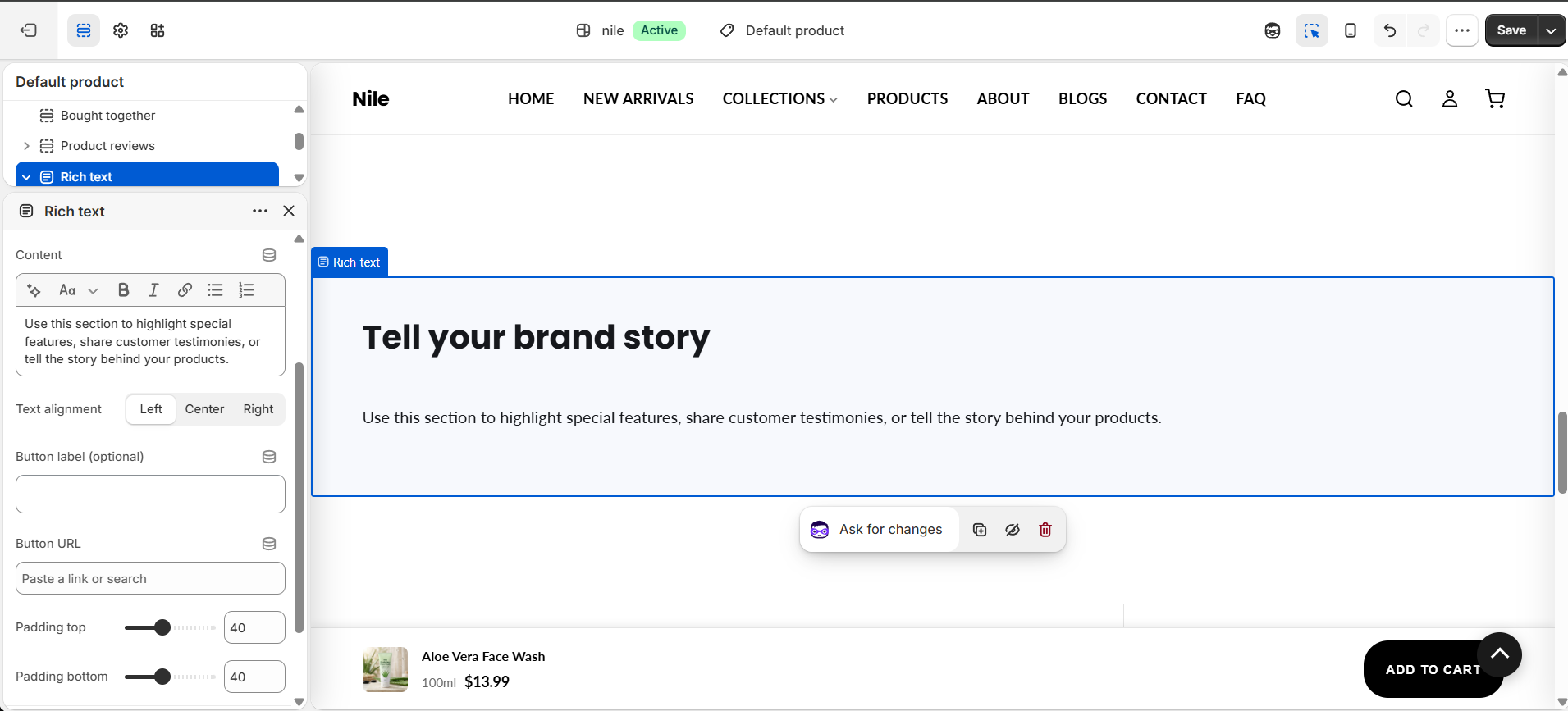
How to use it
In the Shopify theme editor, add or open this section, then:
- In the theme editor, open a product page (or any template using product-sections) and click Add section → Rich text.
- Enter a Heading and write your copy in the Content rich-text field (bold, italics, and links are supported).
- Optionally fill in a Button label and Button URL to show a call-to-action button below the text.
- Choose a Text alignment (Left, Center, or Right) and a Color scheme.
- Adjust Padding top and Padding bottom to control vertical spacing, then Save.
- To hide the section without deleting it, uncheck Show section.
The button only appears when both the Button label and Button URL are filled in; leave either blank to hide it.
Heading, Content, and the button each render only when their field is non-empty, so you can use this section for text-only or button-only layouts.
Text alignment applies to both the heading and the body together.
Settings reference
| Setting | Type | Default | What it does |
|---|---|---|---|
| Color scheme | color_scheme | scheme-1 | Sets background and text colors for the section. |
| Show section | checkbox | true | Renders the section when checked; unchecking hides it while keeping the content. |
| Heading | text | Tell your brand story | Bold heading shown above the content; hidden if left blank. |
| Content | richtext | Use this section to highlight special features, share customer testimonies, or tell the story behind your products. | Main rich-text body supporting formatting and links. |
| Text alignment | select | left | Aligns heading and body Left, Center, or Right. |
| Button label (optional) | text | (empty) | Text on the call-to-action button; button only shows when both label and URL are set. |
| Button URL | url | (empty) | Destination the button links to. |
| Padding top | range | 40 | Top spacing in px (0-100, step 10). |
| Padding bottom | range | 40 | Bottom spacing in px (0-100, step 10). |
The section accepts only @app blocks, so Shopify apps can inject content but there are no built-in repeatable blocks.
Developer notes
Renders section-color-scheme and scopes all CSS/styles to #RichText-{{ section.id }} to avoid bleed between instances.
- Inline
{% style %}block defines.rich-text__heading,.rich-text__body, and.rich-text__button; the button uses--btn-primary-bg/--btn-primary-textCSS variables with black/white fallbacks. - The whole
<section>is gated behindsection.settings.enable_section; @app blocks render outside that gate in a trailing loop. - No JavaScript or theme assets are loaded by this section.
{%- if section.settings.button_label != blank and section.settings.button_url != blank -%}
  <a href="{{ section.settings.button_url }}" class="rich-text__button">
    {{ section.settings.button_label }}
  </a>
{%- endif -%}